Thursday, 4 February 2016

Artist Interpretation - Mechanical Marvel


For my artists interpretation I looked at an artists who's work I admired and tried to recreate there work process. Following the artists process helped as I tried something new, I don't think I will follow his process again as I'm not particularly proud of the end product. I tried my best to incorporate colour as i believed that was the most prominent feature of the original piece but i added my own spin on it by keeping the colour in a cell shading style.

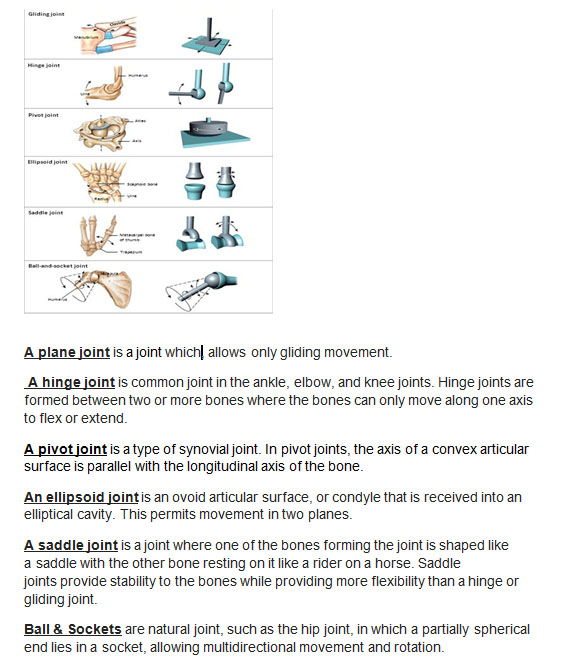
Joint Research - Mechanical Model


I researched different joints and they're uses, this helped me when it came to creating and designing my robot because I already knew how joints moved and what places to put them. This didn't affect my model very much as it didn't have many joints.

Observational Drawings - Mechanical Marvel

I sketched mechanical objects to give me a feel of how parts of my robot would look. I took things that I might incorporate into my robot such as a screw and oil pot. We concentrated on the formal of art so that we could study the skill and be able to employ it into later projects.

Industry Software - Mechanical Marvel

In games design we use many different software, first they use 2D software such as Photoshop and Illustrator. Then they move onto 3D as Maya, ZBrush, Mudbox and 3DS Max. They edit with Sony Vegas Pro and Adobe Premiere. They make texture maps with XNormal.

Adobe Phtoshop

Adobe Illustrator
Autodesk Maya

Autodesk Mudbox


ZBrush


Autodesk 3ds Max


Sony Vegas Pro


Adobe Premiere


XNormal


Wednesday, 3 February 2016

Texture Map Research - Mechanical Marvel

This is my texture research, I looked at diffuse, specular and normal maps. This helped me me understand how to use and where textures should be used with my model.

Tuesday, 2 February 2016

Animation Artist Research - Mechanical Marvel


https://youtu.be/oGH-BAZXJV8

Joel Garvin uses Photoshop and Maya to create his art pieces. He has the same process as me and many other artists, he begins with sketching initial ideas. He then decides which of his initial ideas he like s the most and carries onto to develop those ideas. he then chooses which developed he likes the most and which one he wants to take to a finished p[product, after deciding which one he will finish he moves it into Photoshop and paintsd his final concept. He then Models it in Maya and textures it. After modeling his model he animates and renders it. He's a freelance artist, he mainly models vehicles or Sci-fi mechanics.


3D Artist Research - Mechanical Marvel


Jacques Achilles is a freelance 3D modeller, he concentrates on mechanical creations and robots. he uses Photoshop and ZBrush. His job skills include digital painting and digital sculpting, illustration and concept art. His process is similar to ours, he begins with sketching his initial ideas and then he develops his ideas. After this he moves his sketches to Photoshop where he paints his final finished concept piece, he may create an orthographic. He then creates his 3D model using his orthographic as reference. I don't know his full process because he uses ZBrush which is a piece of software I've never used before.